
Export
Bake a whole preset down to one finished audio or video file.
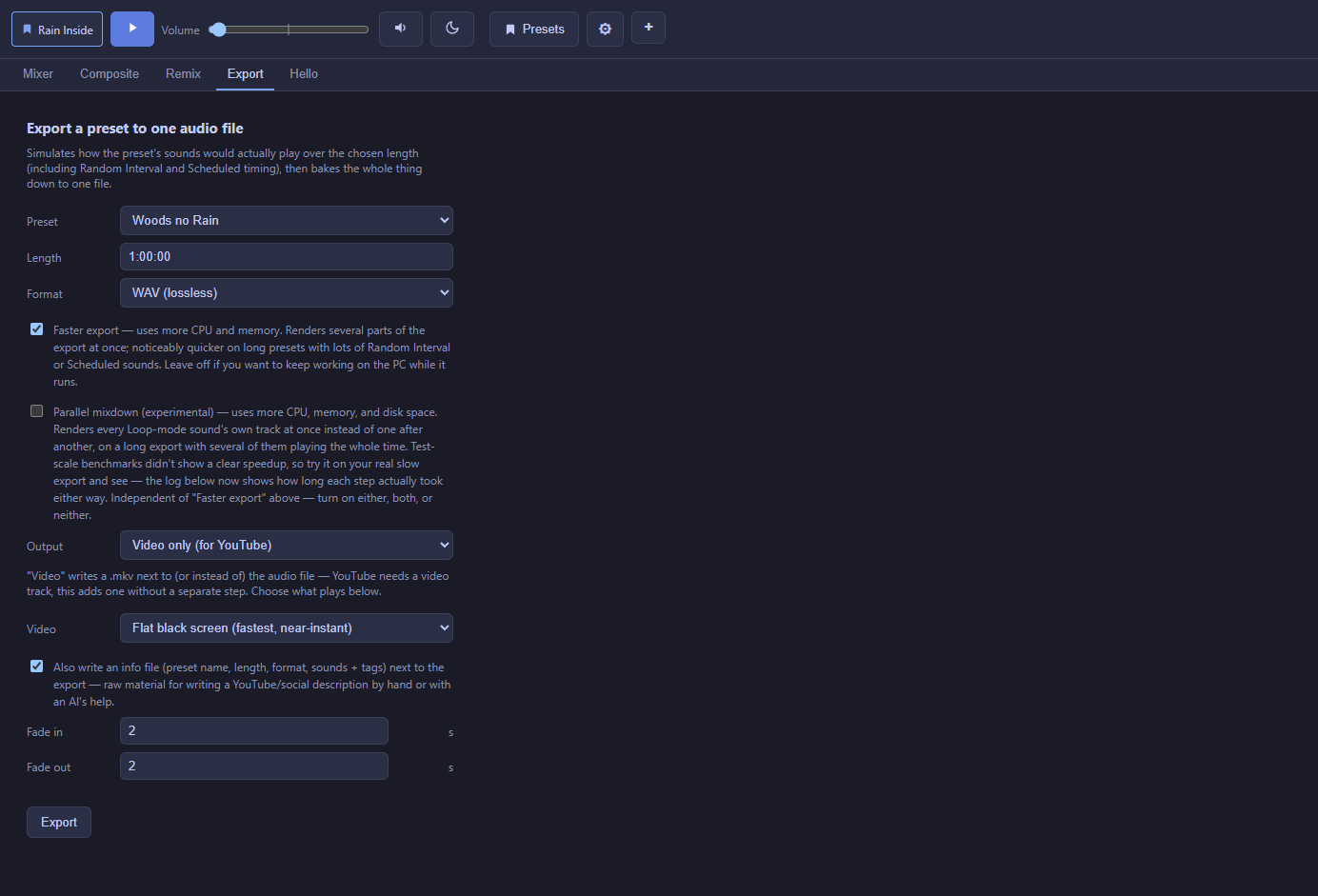
The Export tab simulates how a preset would actually play over a chosen length — including Random Interval and Scheduled sounds firing at realistic moments, Sound Group and whole-mix processing, and Fluctuation drift — then renders the whole thing down to one file. It's the same engine that plays your mix live, run once and captured to a file instead of listened to in real time.
Basic settings
First pick the export type at the top: Audio or video file or For phone. The tab remembers your type, length, format and fades for the next export, and the preset starts on the one loaded in the Mixer.
- Preset and Length — which mix, and how long the exported file should be.
- Format — including lossless WAV and space-saving compressed formats (Opus needs a specific sample rate internally, which Noctívago handles for you).
- Fade in / out — in seconds, at the start and end of the export.
For phone
For phone saves a preset file for the Noctívago phone app (Android preview, GitHub Releases) instead of a fixed-length mix. Every sound's Remix settings and all reverb (the sound's own, its Sound Group's and the whole mix's) are baked in, so the phone only has to mix and the battery lasts. Only the preset picker shows; length, format, fades, video and the info file are for file exports. A loop longer than 10 minutes ships as its middle 15 seconds, and the result warns you if the preset may need too much memory for a phone. Needs Noctívago 0.1.268 and Export 1.1.0 (the type picker: Export 1.2.0).
It works the other way too: the phone app builds mixes from your own sounds and Share sends one as a .ncvpreset. On the PC, open Presets, click Import preset… and pick it, like any preset file.
Video output, for platforms that need one
Choose Audio only, Video only, or Both. When a video is produced, pick its background:
| Background | What it is |
|---|---|
| Flat black screen | Fastest option, just your audio muxed under a plain 1080p frame — good for a straightforward YouTube upload. |
| Audio-reactive visualization | Waveform, spectrum, or vectorscope, in a color/palette you choose, reacting to the actual audio. |
| Loop a video file | Your own background video clip, looped or trimmed to match the export length. |
| Loop an image | A still image, optionally with a slow spin or a "DVD bounce" motion. |
Speed options
Faster export renders independent parts of the export several at once instead of one after another — noticeably quicker on a long preset with a lot of Random Interval/Scheduled activity, at the cost of using more CPU and memory while it runs.
Extra output
An optional info.txt file written alongside the export is raw material for a YouTube or social media description, written by hand or with an AI's help (it ends with a ready-to-paste prompt for that). It contains:
- The basics: preset name, length, format, and every included sound's name and tags.
- How the scene is set up: each sound's volume, how it plays (loop, random interval, or scheduled), its group, and any settings that change how it sounds: pitch, pan, drift, effects, and so on. Sound Groups and whole-mix processing are listed too.
- Credits: author, license, and link for every sound from Freesound, plus the source link for anything added from a link. Sounds that need attribution are marked, and any sound with an unknown license is listed so you can check it before publishing.
Editing the AI prompt
When the info file is on, a text box under it holds the prompt that goes at the end of the file. Leave it empty to use the built-in prompt (shown faded in the box), which asks for a YouTube title, description, and tags, and a short line saying the mix was made with Noctívago. Type your own and it's used exactly as written instead. Your prompt is remembered between sessions; clear the box to go back to the default.
Progress and completion
A real progress bar and a scrolling log show exactly what's rendering; the log also saves to a text file next to the export so it's not lost if you're not watching. A chime plays on completion (a different tone for success vs. failure) so you don't have to babysit a long export.